Model — Build Your Molecule
Construct and pre-optimize molecules using a 2D skeletal editor and a 3D interactive viewport that share the same molecular graph. Import from SMILES or structure files, inspect descriptors and stereochemistry, apply fragments and VSEPR templates, and prepare either molecular or periodic structures for calculation.
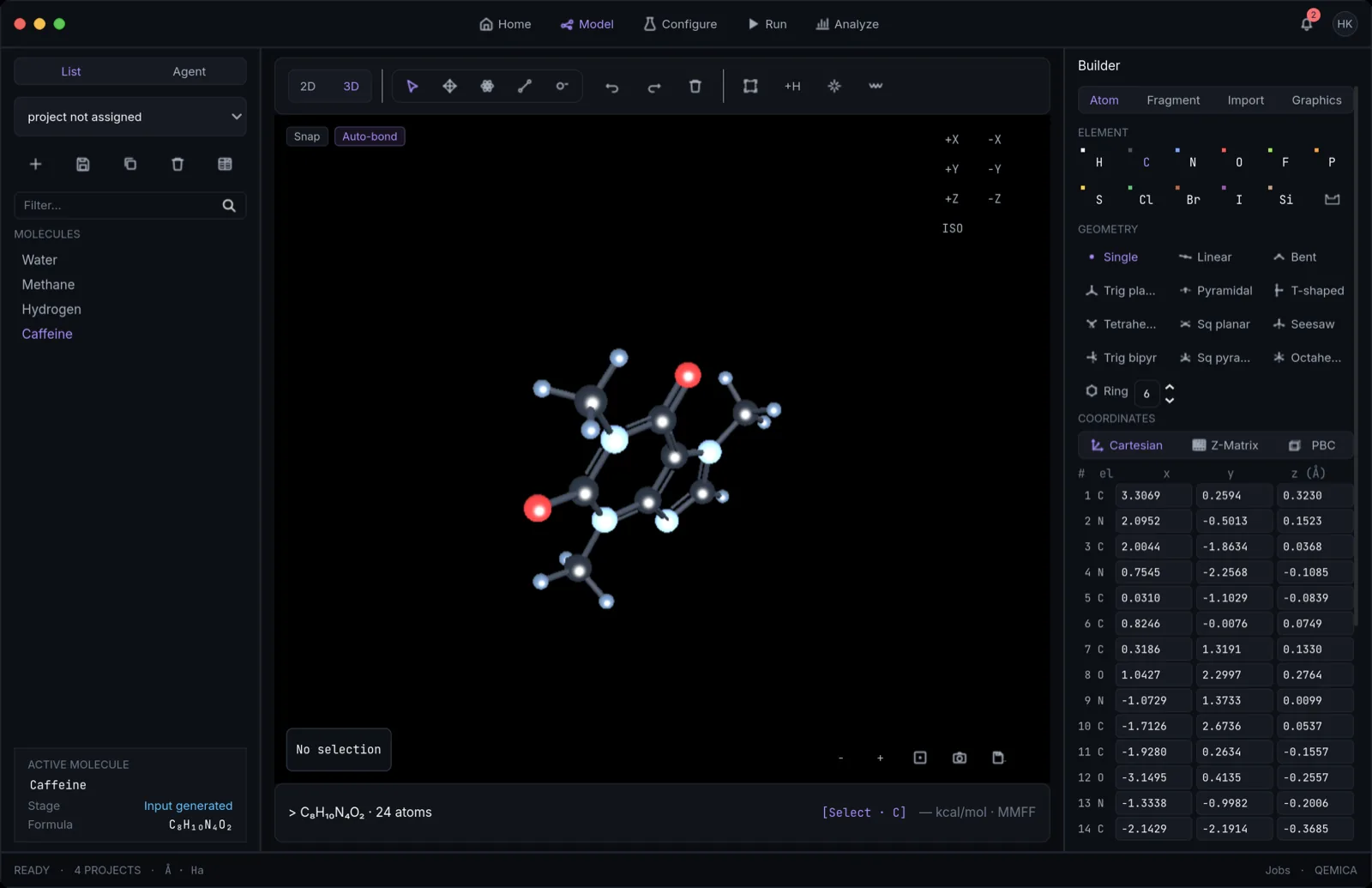
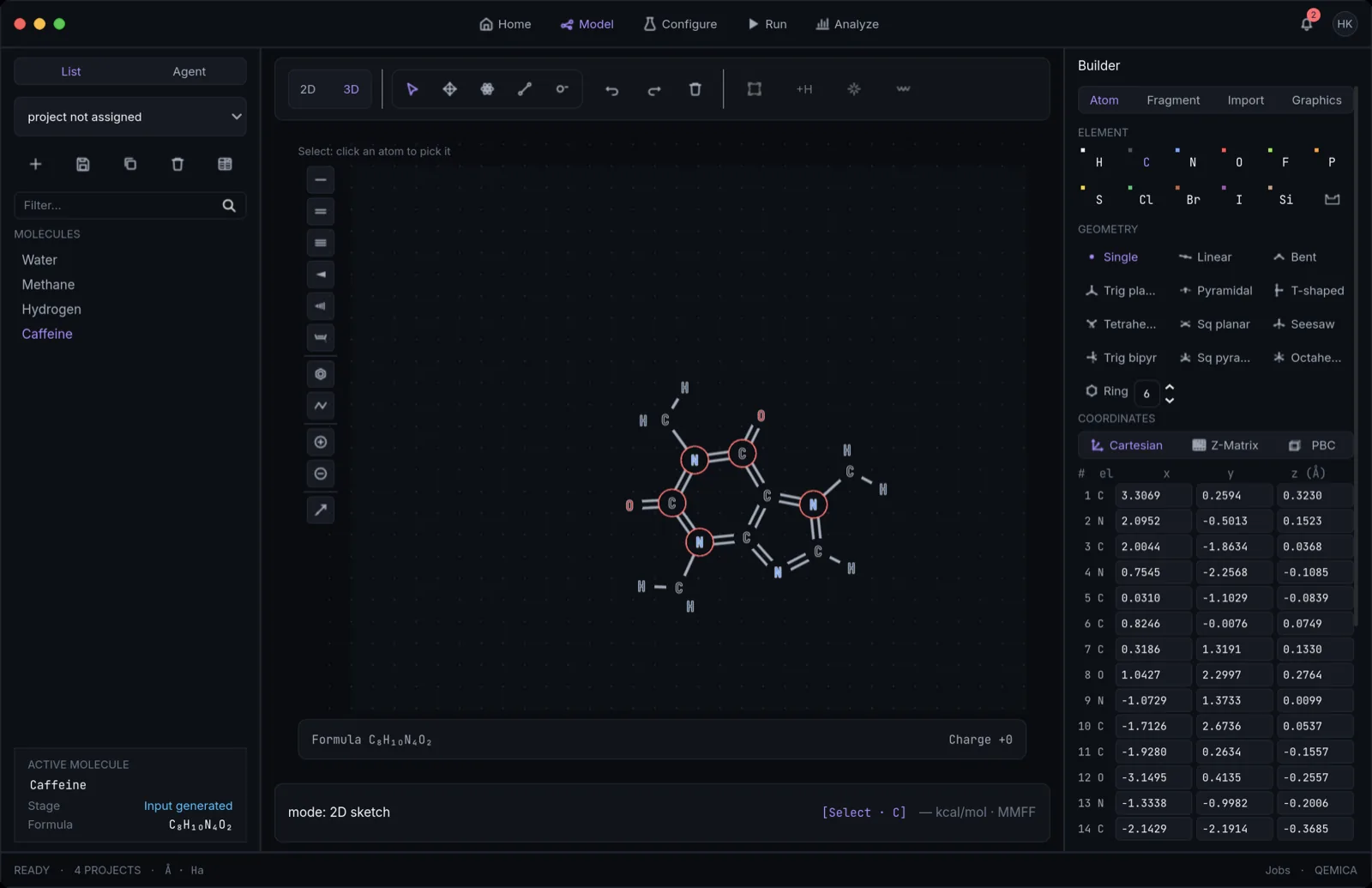
2D sketch and 3D viewport with toggling
- Click the 2D|3D toggle (top-left) to switch views. Both share the same topology; coordinate changes synchronize on toggle.
- 2D mode: a skeletal-formula editor — draw bonds by click-dragging, place atoms by picking an element and clicking, draw 3–7-membered rings and benzene from templates, and add stereo (wedge/hash) and charges.
- 3D mode: rotate (right-drag), pan (middle-drag, or shift/alt + right-drag), zoom (scroll); pick atoms and bonds by clicking and drag atoms to move them, with bonds adjusting automatically. Ctrl-drag rotates the current selection in place — handy for orienting a just-attached fragment.
- The ViewCube includes a Persp/Ortho switch. Perspective shows familiar depth foreshortening; orthographic projection uses parallel rays so on-screen lengths compare directly. The setting follows every 3D result viewer.
- Switching 3D→2D projects geometry onto a best-fit 2D layout; switching 2D→3D embeds the sketch into real 3D coordinates automatically (ETKDG + MMFF94 when RDKit is available; a flat lift shows instantly as the placeholder).
SMILES, InChIKey, and file import/export
- Paste a SMILES into the right rail's Import tab (Convert SMILES) and confirm; RDKit parses it and rebuilds the structure, reporting an invalid string with the parser's own error.
- A canonical InChIKey is computed for every structure and used for deduplication and exact-identity search.
- Import files via the Import tab: .xyz, .mol, .sdf, .pdb (RDKit) or .mol2, .cif, .cml (Open Babel); you can also fetch structures from PubChem by compound name or CID.
- Export the final geometry from the Modeler's Save As… toolbar button (.mol, .sdf, .mol2, .pdb, .xyz) or from the Analyze Geometry tab's export menu (.xyz, .mol, .pdb).
Fragments, rings, and VSEPR templates
Use the right-rail libraries to assemble structures quickly. Fragments attach with a single click on a target atom; geometry templates impose ideal VSEPR angles around a central atom.
- Fragments tab: 29 built-in templates across Alkyl (9, e.g. ethyl, tert-butyl, –CF₃), Rings (6, e.g. phenyl, benzyl, cyclohexyl), and Functional (14, e.g. –OH, –NO₂, –C≡N, –COOH, –N₃). Select a chip, click an atom, and implicit hydrogens fill free valences.
- Custom fragments: select any group of atoms, name it in the Fragments tab, and it becomes your own reusable chip (✕ deletes it; custom fragments persist across sessions and projects).
- Ring templates (2D): draw 3–7-membered rings or aromatic benzene; vertices snap to ideal angles.
- VSEPR geometry chips: 11 shape templates from AX₂ to AX₆ — Linear (180°), Bent (104.5°), Trigonal planar (120°), Trigonal pyramidal (~107°), T-shaped, Tetrahedral (109.5°), Square planar, Seesaw, Trigonal bipyramidal, Square pyramidal, and Octahedral (90°) — plus a bare-atom chip. Select an atom, click a chip, swap ligand elements with the Atom tool, then Optimize.
Valence awareness and force-field pre-optimization
- Skeleton drawing is implicit — free valences are highlighted, invalid valences are flagged inline, and the live formula updates as you draw.
- Optimize (✦ toolbar): runs RDKit ETKDG + MMFF94 to relax the current geometry. Energies are reported in kcal/mol — this is steric and van der Waals only, not quantum energy.
- 2D→3D embedding: flipping the 2D|3D toggle embeds the sketch into 3D coordinates (ETKDG + MMFF94) automatically — no separate action needed.
- Conformers: generate an ETKDG ensemble (up to 20 geometries) ranked by MMFF94 energy; preview and click Use to adopt one.
Descriptors and stereochemistry
- When RDKit is available, the strip below the viewport reports formula, molecular weight, Crippen logP, topological polar surface area, hydrogen-bond donors and acceptors, rotatable bonds, and Lipinski rule-of-five violations.
- CIP R/S labels appear beside stereocentres in both the 2D sketch and the numbered 3D atom labels; E/Z assignments appear on the 2D structure.
- Descriptor updates are debounced while you edit. Very large structures keep the lighter formula-and-atom-count display instead of calculating drug-like descriptors.
Hand off to Configure. MMFF94 pre-optimization is a fast classical cleanup that gives the quantum engine a sensible starting geometry — always tidy a sketch before an expensive ab initio run. When the structure is ready, click Configure in the top navigation bar. Charge and multiplicity set on the molecule carry through to every calculation.
References
- RDKitLandrum et al., RDKit: Open-source cheminformatics
- ETKDGRiniker & Landrum, J. Chem. Inf. Model. 55, 2562 (2015); Wang, Witek, Landrum & Riniker, J. Chem. Inf. Model. 60, 2044 (2020)
- MMFF94Halgren, J. Comput. Chem. 17, 490–641 (1996), parts I–V
- InChIHeller, McNaught, Pletnev, Stein & Tchekhovskoi, J. Cheminform. 7, 23 (2015)
- PubChemKim et al., Nucleic Acids Res. 51, D1373 (2023)
- VSEPRGillespie & Nyholm, Q. Rev. Chem. Soc. 11, 339 (1957)